

.png)
Not all your content should sound the same. Different audiences, platforms, team members or campaigns require different tones, perspectives and messaging. That’s why we have Brand Profiles in Whaaat AI.
This feature lets you save multiple brand voices, each tailored to:
- Who you're speaking to (different audiences)
- Who's doing the speaking (founder, your brand, or your sales representative)
- What kind of content you're creating (professional article, social media post)
- Where do you speaking (LinkedIn vs Reddit vs Instagram)
You can assign these profiles to any AI agent, like Ted (X/Threads), Lin (LinkedIn), Sepp (SEO), Mel (email) and more, when messaging them, to instantly get content that sounds relevant and on-brand.
Here’s how real teams are already using it 👇
1. 🎯 Audience Targeting
Different audiences have different needs, expectations and language. If your brand speaks to multiple groups, it’s a great opportunity to create separate Brand Profiles for each one, even if it's technically the same brand.
🧪 Real Example: Bitwala
Bitwala speaks to both:
- Hardcore Bitcoiners on X
→ Content for crypto-native people on twitter
→ More technical, fast-paced and insider-savvy
→ Voice is bold and edgy - Traditional investors on LinkedIn
→ Content for financial/institutional crowd on LinkedIn
→ More focused on market potential, innovation, etc.
→ Voice is formal, structured and risk-aware
🧪 Real Example: Nursing Service (Pflegedienst)
Our other user, a Nursing Service (Pflegedienst), also speaks to 2 very different audiences:
- Elderly clients (the service users)
→ Messaging needs to be warm, clear and emotionally reassuring
→ Focus is on care, dignity, and human connection - Their children (the researchers and often decision-makers)
→ Messaging must be informative, trustworthy and practical
→ Focus is on reliability, safety and professionalism
By creating two Brand Profiles, you can:
- Assign the right brand profile to the right agent (e.g. Ted for Bitcoiners, Lin for Investors)
- Keep both voices consistent across channels
- Upload different supporting materials (URLs, decks, docs) per audience
2. 🧍 Multi-Persona & Team Voices
Solo founders and consultants often wear multiple hats. With Brand Profiles, you can save one for each persona or speaker:
- Personal brand voice
- Client ghostwriting voice
- A teammate’s voice (e.g. CEO vs. Product Manager)
🧪 Example: One of our Solopreneurs
- He uses a brand profile for himself
- Tip: Simply extract your LinkedIn profile as a pdf and upload it as a file for better ghostwriting
Each profile reflects a different tone and audience, but all stay consistent thanks to reusable setup.
3. 👥 Client Voice Management (for Agencies)
If you're running content for multiple brands, Brand Profiles make it easy to store and switch between them.
For every client, agencies can:
- Upload pitch decks, URLs or blog posts
- Add custom info like USPs or things to avoid
- Assign to any agent and generate voice-aligned content instantly
🧪 Example: SEO & Marketing Agencies
Agencies create a Brand Profile per client, allowing writers and marketers to:
- Jump between brand profiles
- Keep brand tone consistent across blog, LinkedIn, email, etc.
- Eliminate repetitive briefing
4. 💡 Use-Case Specific Messaging
You can also create different profiles for specific products, services, or campaigns within the same brand.
🧪 Example: one of our Hotel clients – Parkhotel Dresden
They use:
- One profile for wedding offers (romantic, emotional)
- One for corporate retreats (structured, value-focused)
- One for event packages (fun, community-driven)
Parkhotel Dresden is a multi-purpose event location and their content needs vary widely depending on the occasion:
- Corporate events → clear, formal, benefits-focused
- Ü30 Schlager parties → nostalgic, fun, casual
- Deep house & techno nights → edgy, cool, nightlife-savvy
- Balls and receptions → elegant, classic, upscale
- Children’s events → playful, safe, family-oriented
- Weddings → romantic, warm, emotionally resonant
This way, each piece of content fits the customer’s intent, even if it's all under one roof.
🧠 Quick Summary:
👉 Use Brand Profiles when you need to:
- Target different audiences, personas, or tones
- Switch between team members, clients, or platform voices
🛠️ How to Set Up a Brand Profile in Whaaat AI
When you first sign up, we walk you through creating your first Brand Profile during onboarding. All you need to get started is a URL – we'll scan it and automatically generate your voice, audience, and perspective summaries. That alone is enough to start getting on-brand content from any agent.
From there, you'll always select a Brand Profile before chatting with an agent. Think of it as the briefing that gives every agent the context it needs to write in your voice, for your audience.
How to Switch & Set Up New Brand Profiles
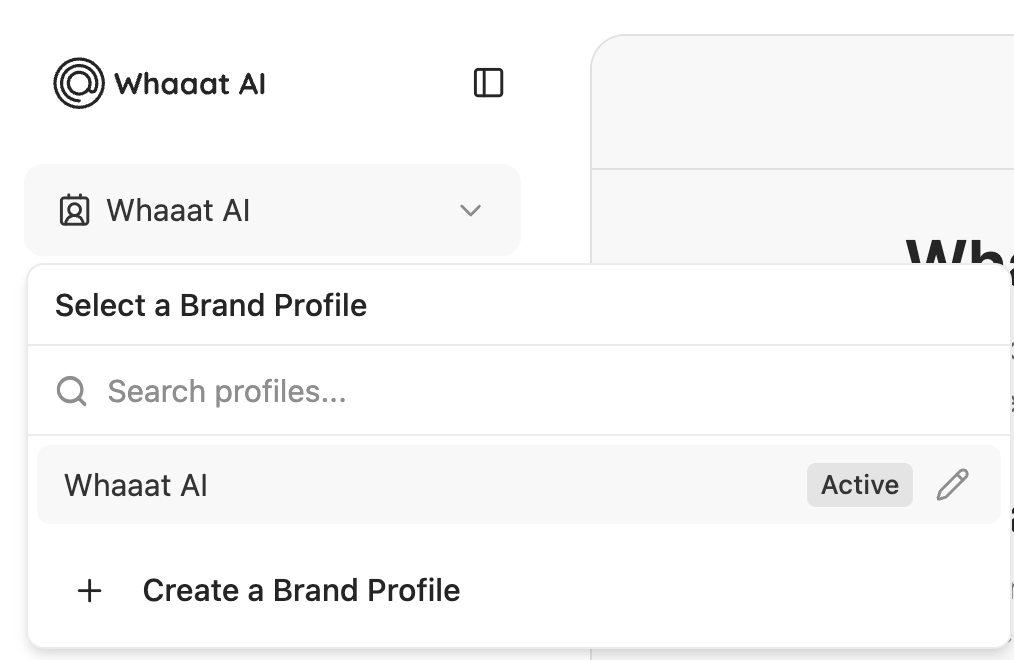
In the left navigation bar, just above the "New Chat" button, click on your currently active Brand Profile. From there you can switch to an existing one or create a new brand profile from scratch. This is especially useful if you're targeting different audiences, managing multiple clients, or running campaigns that need their own tone.
To make your profiles even sharper, you can enrich them with additional context: upload files like PDFs, slide decks or one-pagers, add more URLs for reference, or use the "Custom Information" section to give agents specific instructions – anything from "always include a CTA" to "keep the tone casual and friendly".
Once created you can quickly switch between Brand Profiles and your outputs will reflect the right tone and direction, every time.
🚀 Ready to get more out of your content?
Set up your Brand Profiles now and speak to every audience like you actually understand them.
What’s Included
Starter
.png)
Pro