

.png)
Creating content for social media rarely means creating just one post. A single idea usually needs to turn into:
- a LinkedIn post
- an Instagram caption
- an X (Twitter) post
- a newsletter
- blog article
Most AI tools still treat this as separate work. One prompt. One output. One platform at a time.
That’s where content creation slows down.
Why creating content for multiple platforms is still hard with AI
Even with AI, most teams end up:
- rewriting the same idea for each platform
- copying context between chats
- adjusting tone and length manually
- second-guessing whether posts are still aligned
Worse, many tools expect you to:
- define the target audience
- explain platform rules
- craft detailed prompts for each channel
And then there is another layer of friction: Each platform has its own rules, with different formatting, different text length, hashtags here, no hashtags there.
That’s not how marketers think…and it’s not how fast content gets made.
A simpler way: One Idea, all platforms, one go
With Whaaat AI, creating content for all social media platforms at once works differently.
You don’t need to:
- pre-prompt
- define audiences
- ensure format is correct
- explain platform logic
- repeat yourself
You simply:
- Describe the topic or angle
- Tag the agents or platforms you want
- Get platform-ready content back, all at once
For example:
“We’re announcing a new feature that gives social media content for all platforms at once and is focused on saving marketers time.
@Lin (LinkedIn) @Ines (Instagram) @Fibi (Facebook) @Ted (Twitter/X) @Mel (Newsletter) @Ben (Blog Post)
That’s it.
Each agent understands:
- its platform
- your brand voice
- the shared context
Everything else happens in the background.
Create content for all platforms without switching tools or agents
Instead of moving between chats or rewriting outputs, Whaaat AI lets you:
- create aligned content across platforms
- keep messaging consistent
- save time on coordination
- focus on ideas, not formatting
One message turns into multiple ready-to-use assets, without back-and-forth.
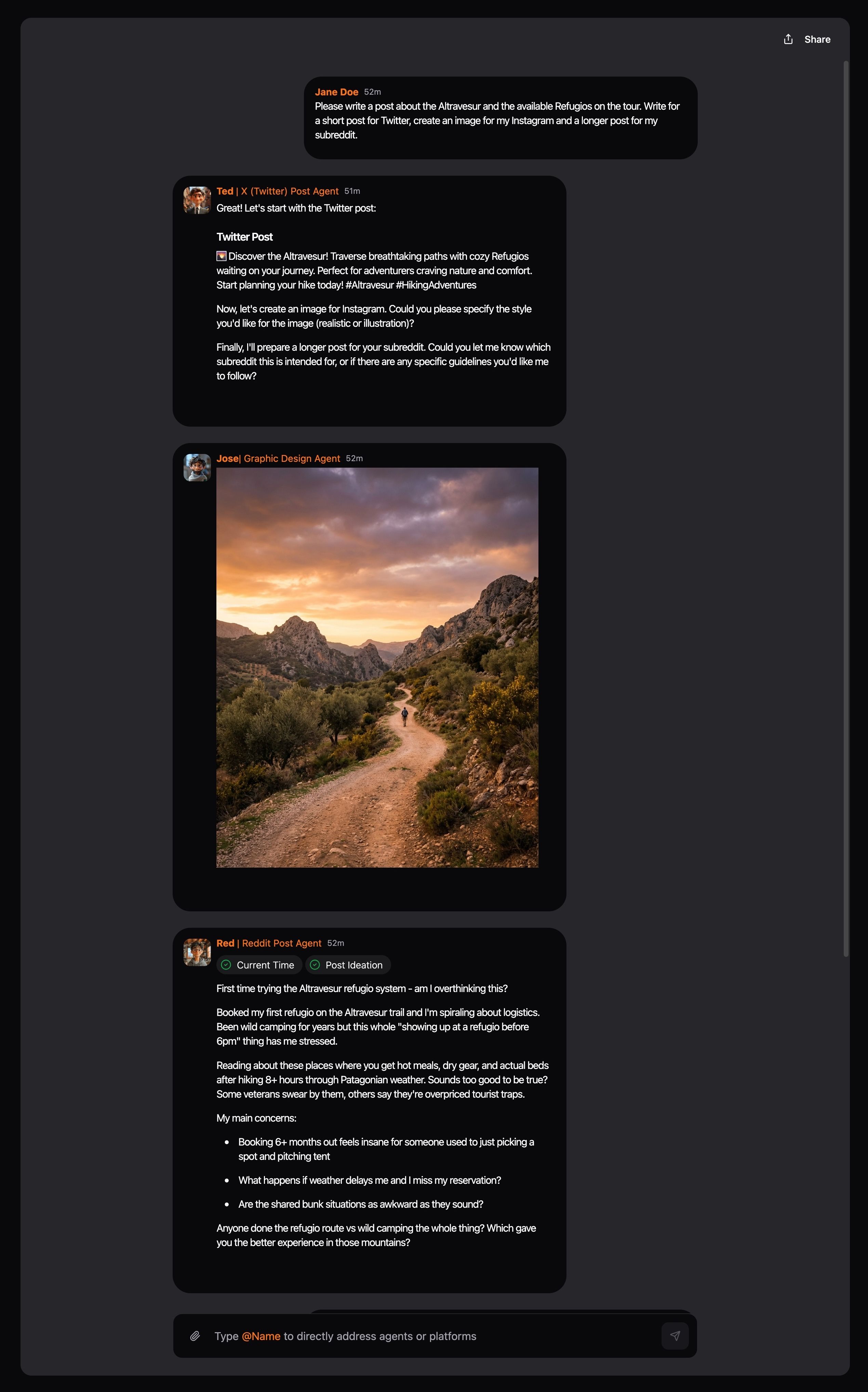
Real examples that get results
Product Launch Campaign:"@Lin @Bob @Mel @Ines - Launching our AI writing assistant. Focus on time savings for busy founders. Include our 50% launch discount."
Results: LinkedIn post, blog article, newsletter, and Instagram content ready in under 3 minutes.
Weekly Content Batch:"@Ted @Lin @Fibi - This week's theme: Customer retention strategies. Keep it practical with real examples."
Results: Twitter thread, LinkedIn post, and Facebook post covering the same topic from different angles.
Event Promotion:"@Ines @Tiki @Lin @Mel - Our 'AI for Small Business' webinar is next Tuesday. Emphasize free actionable takeaways."
Results: Instagram story content, TikTok script, LinkedIn event post, and email invitation.
Why multi-agent content works
Platform Optimization: Each agent understands their platform's best practices. Lin knows LinkedIn favors professional insights. Ines optimizes for Instagram's visual-first approach. Ted creates Twitter-friendly threads.
Consistent Messaging: All agents work from the same brief, ensuring your message stays consistent while adapting to each platform's style.
Massive Time Savings: What used to take hours now takes minutes. Create a week's worth of social content in one request.
Better Engagement: Platform-native content performs better than copy-paste posts. Each agent creates content that feels natural to their platform.
Transform your content workflow
Multi-agent content creation isn't just faster. It's smarter. You maintain message consistency while optimizing for each platform's unique audience and format.
Before: Platform-by-platform content creation (2-3 hours)
After: Multi-agent requests (5-10 minutes)
Before: Inconsistent messaging across channels
After: Cohesive campaigns that reinforce your key messages
Before: Content creation bottlenecks
After: Batch content production that scales
Ready to stop spending hours on multi-platform content? Try requesting content from multiple agents in one go. Your content workflow will never be the same.
What’s Included
Starter
.png)
Pro